Note: All the information are Collaborated from SmartBrain.com and various Other Sources.
The fact is, there is no major field of software engineering more rife
with potential hazards than that of mobile development, and we’ve all
experienced for ourselves the sudden surge of frustration that results
in a deleted application. In the rapidly growing mobile market—unlike
the more familiar realm of desktop- and web-based software—your customer
is often on the move, and the proverbial moment of truth is just a
narrow slice of time, so you really don’t get a second chance to make a
first impression. An ugly GUI, a confusing UX, or a series of
interminably slow API calls can lead to your app’s tragic demise before
it ever has a chance to grow and thrive.
This is why mastering the art of
mobile testing is increasingly
important for any company that wants to remain competitive. Far too
many developers, it seems, are content to just throw their latest rushed
apps at the App Store wall and see what sticks. The approach is
certainly understandable. Software testing can be hard work. To remain
competitive in a fast-paced and crowded market, sometimes cutting
corners makes sense. But choosing speed and quantity over care and
quality has never been a good long-term business strategy, and the
app-store halls of Apple, Google, Amazon, Windows, BlackBerry, et al.,
are littered with thousands of
one-star reviews that tell a tragic tale.
It doesn't have to be this way. The vast majority of software firms
already recognize the value of investing in the development of mobile
apps, so it only makes sense to extend that investment into
testing mobile apps
as well, despite all of the added cost and complexity that programming
and testing for a vast array of mobile platforms entails. In the long
run, the extra work involved in quality assurance usually pays off. And
in a world where
Gartner estimates
that $26 billion dollars in revenue was generated from 102 billion
mobile app downloads in 2013, and we may be seeing over 268 billion
downloads per year by 2017 (or around $68 billion dollars), that
potential payoff for
automating android testing may be worth taking seriously.
In this article, we’ll take a broad look at the state of mobile testing
and development today, exploring its tremendous potential, its unique
perils, and the exciting promise of what lies ahead in this continuously
evolving field.
Rise of the Planet of the Apps
Ever since January 9, 2007, when Steve Jobs
held aloft his magic iPhone
and brought the world’s early adopters to their knees, we’ve been
living in a different world. It’s a world where, according to the
International Telecommunication Union’s
2014 report,
the total number of cellular subscriptions is fast approaching seven
billion—one mobile phone for nearly every person on the planet—and
22% of those subscriptions are for smartphones. Research by
Business Insider
indicates that prior to the iPhone, only 2% of the global population
had smartphones—and the old BlackBerry and Treo, as far as app
development went, weren’t particularly exciting. But now, with one out
of every five persons on the earth carrying an advanced computing
platform in his or her pocket and more acquiring them every day, the
creative potential and financial incentive for developers interested in
mobile applications has never been greater.
In a “
State of Mobile”
study of 1,040 software developers, testers, and consumers conducted by
SmartBear and published in early 2014, we discovered, among
other things, that:
- Nearly 30% of those building any kind of apps were building mobile apps
- 54% of respondents who were building mobile apps had entered the space within the past two years.
- 84% of those who were not currently building mobile apps planned to enter the space in the near future.
- 30% of companies were planning to develop 5-20+ new apps in 2014.
- 40% of consumers download 5-20+ apps in a single month.
Stats like these drive home the growing significance of the mobile
market—especially the last two figures, which suggest that the
monthly consumer demand is currently exceeding the entire
annual
supply of apps produced. You don’t need to be an economist to see the
enormous market potential here. And if you or your organization are
among those arriving fashionably late to the mobile party, perhaps due
to the common impression that most smartphone, tablet, or phablet apps
are for social networking and gaming, be advised: a 55% majority of
mobile app developers in our survey were working on applications for
Business Productivity, Utility, and Finance. The rest of them were
attending to the other usual suspect categories—Social Networking,
Games, Lifestyle, Navigation & Travel, and Entertainment—and yet not
one of these genres claimed, in itself, more than 6% of the developers
polled. So it clearly isn’t all just
fun and
games, but no matter what your personal or corporate focus may be, there is
probably sufficient demand out there to justify creating an app for that.
Still, with so much competition out there, which is only increasing with each passing day, what’s going to ensure that
your
app succeeds while others fail? Once again, apart from originality
there’s only one market factor in software development that you can
reliably control, and that’s
quality. According to the
consumer reports collected by our survey, nearly 50% of users will
delete a mobile app if they encounter a single bug. And as the
following chart shows, they care about quality—particularly
functionality and speed—more than developers and testers currently do:
 (A slide from SmartBear’s State of Mobile 2014 webinar and eBook, available here.)
It’s therefore safe to say that when it comes to the success of
mobile apps, nothing is more important to focus on than quality . . . or
more challenging to attain.
Understanding the Challenge of Mobile Testing
Naturally, if quality assurance for mobile apps was easy, more people
would be doing it (or at least doing it better). But as anyone who’s
ever taken a single step into the mobile minefield knows, things get
rather tricky, fast. Developers and testers are immediately confronted
by multiple operating systems (and different versions of each OS,
especially with Android), multiple devices (different makes and models
of phones, tablets, phablets), multiple carriers (including
international ones), multiple speeds of data transference (3G, LTE,
Wi-Fi), multiple screen sizes (and resolutions and aspect ratios),
multiple input controls (including BlackBerry’s eternal physical
keypads), and multiple technologies—GPS, accelerometers—that web and
desktop apps almost never use. There are countless
testing tools to select from, and even then a home built piece of software may be an option.
Yet even before we take all of those shifting factors into account, we have to pin down what
kind of app we want to develop or test in the first place. There are
native apps,
web apps, and
hybrid apps to choose between, and they’re each built differently.
Native apps, the most common form, are applications built to run on a
specific mobile device’s hardware, sometimes with and sometimes without a
data connection—like the Kindle app, for example, or Angry Birds. Web
apps, however, almost always require a data connection, are usually
designed to run across all platforms using the same basic code, and are
really not “apps” in the app-store sense but are simply, as the name
suggests, web-based applications. The difference between an ordinary
website and a web app in this context, though, is that these apps range
from mobile-friendly versions of websites to websites that are
custom-built (usually with HTML5, JS, CSS), from the ground up,
specifically for display and use on mobile devices. Finally, with regard
to hybrid apps, these are essentially web apps packaged in a native-app
wrapper—available in app stores and designed for use only on mobile
devices, but also relying heavily on communication with a website or
web-hosted database, such as via APIs, in order to function at all.
(One common example is the Wikipedia app, which requires an active
connection to Wikipedia.org’s online database to deliver its Apache
Lucene search results.)
In other words, opening the Pandora’s Box of mobile testing and
development is not for the faint of heart. But for those courageous
souls who have dedicated their lives (or at least careers) to mastering
the art and science of software quality assurance, let’s continue with a
closer look at five of the biggest challenges facing QA testers of,
say, native apps. (While we’re focusing on testers in this article, it’s
good to bear in mind that the majority of developers, especially on
agile production teams, also perform testing throughout the mobile-app production cycle—around 72% of them, according to our
survey.)
(1) Device Fragmentation: These days, it isn’t simply a
matter of testing an iOS app or an Android app; you have to test each
app’s functionality and appearance across a huge variety of physical
devices, which, as a result of possessing distinct hardware
characteristics, utilize even the same versions of installed software
differently. If you’ve ever seen the selection in an
AT&T store, browsed the collection at
Verizon, or played with the phones in an
O2 shop, you know that the actual variety of mobile devices on the market
at any given time
is itself enough to boggle the mortal mind. You can, of course, choose
to test your software on only the most popular models, but new devices
are constantly being released, not making that task any easier. Just
think of the perennial Mac vs PC difficulties, especially before Macs
adopted Intel chipsets. Then multiply that by Samsung, LG, HTC, Sony,
Motorola, ZTE, TCL, Huawei, Nokia, Amazon, Apple, and others—plus all of
the ROM, display, and OS variances
within each of those manufacturers’ product lines. Yikes.
(2) Data Consumption: It’s no secret that mobile apps
can wreak havoc on your phone bill. For those not lucky enough to have
unlimited data plans or a perpetual Wi-Fi connection, remaining mindful
of one’s app usage is a very real concern. Google Maps, Waze,
YouTube—all data-hungry applications can suck your allotted data-plan
dry, and too many exorbitant payments to Verizon can make one rethink
his or her smartphone habits. The simplest solution is often to simply
delete the most nonessential but data-hogging apps. Don't let yours be
one of them; test to see how much data your applications really use.
And while you’re at it, check for data-speed consistency too (i.e., does
your app run as well on 3G or LTE as on Wi-Fi?).
(3) Processing Power and Battery Life: Gamer, much?
Just like with laptop PCs, nothing taxes the processing power, memory,
and battery life of a mobile device more reliably than video games.
Rendering high-res framerates smoothly always takes its toll, but games
aren’t the only apps worth worrying about. Mobile web browsers excel at
draining memory resources, and certain streaming-music apps don’t fare
so great, either. But these are just the obvious culprits. Any kind of
app could be a resource hog. If you don’t run performance tests to vet
your application properly, you could be the next app creator responsible
for draining an iPad battery before the morning subway commute is done.
(4) GPS, Biometric Scanners, Gyroscopes, Accelerometers: Some
of the things that most desktop and web application developers rarely,
if ever, need to take into account are the very things that make mobile
apps so incredibly useful. But programming apps to use a phone’s GPS,
gyroscope, fingerprint sensor, or accelerometer capabilities can be
terribly problematic. Does your geolocation-enabled dining app cease to
function if it loses a GPS connection . . . completely? Partially?
Can your e-reader app use the accelerometer to switch between horizontal
and vertical screen orientations? Can you program your Flappy Bird
clone to use the iPhone’s gyroscope and make the game even harder?
(5) Touchscreen UX and GUI: The thing that changed
everything, spawning the entire mobile-app world as we know it, was the
original iPhone’s jaw-dropping touchscreen. The fluidity of it, the
natural, effortless user experience, simply dragging one’s finger across
a rounded machine of smooth metal and glass resting gently in the palm
of one’s hand—nothing like it had ever been seen before. And nearly
every smartphone and tablet computer today is modeled after its design.
But it wasn’t the hardware alone that made it work; it was the
seamlessly integrated GUI in the form of iOS and its touch-sensitive
apps. The bar was set high from the start, and any app developers today
have to clear it. So when testing your app, ask yourself: Is this app
intuitive? Is it easy to figure out and use? Does it respond to my
every gesture and whim as it should? Most of all, is it pretty?
So, as you can see, although there are clearly some big challenges
facing testers of mobile apps, fortunately the same familiar tools and
techniques that are used for desktop and web applications can also be
used to test mobile ones—along with a few additional tools, like
emulators, to make testing a vast array of devices just a little bit
easier.
Choosing a Mix of Mobile Testing Solutions
Because 50% of mobile users will delete an app if they find just one
bug, putting in the time and effort to make sure that your applications
are error-free is critical. But eradicating programming glitches is
only part of the story. An equally important task for testers is to
help ensure the overall quality and value of the product itself,
striving to look at an app more objectively than its developers
typically can. Does it perform as expected? Is it intuitive? Is it
well-designed and easy to use? And most importantly: Will your
end-users love it and want to share it with their colleagues and
friends?
Those kinds of questions can usually be answered by the most common quality-assurance practice for mobile apps:
manual testing.
Using the actual smartphones or mobile-OS tablets at their disposal,
testers can perform a variety of usability and functional tests on apps
under development, checking features such as sign-up and login fields,
menus and navigation, touch gestures and scrolling, input key
functionality, screen size and GUI appearance, connection speed and data
handling, interruptions (such as how your app responds to an incoming
phone call or text), operating system versions, crashes and error
messages (does your app display an actionable message or simply stop
working?), accelerometer response, etc. Seeing how an app functions in
real time on a real device is, of course, an irreplaceable testing
method, and testers should try this on as many of the most popular
devices that they can get their hands on (or enlist beta testers to
help).
But with so much device variance in the marketplace, it’s impossible to
physically test them all—and yet it’s getting close to being possible,
virtually. To take manual testing all the way,
emulators and
simulators are an app tester’s best friend, and software tools like
Genymotion—along with common SDKs (software development kits) for Android and iOS, including the
iOS Simulator—allow
testers to check their apps’ functionality and behavior across a wide
variety of virtual devices. These digital versions of smartphones and
tablets replicate not only different OS versions, but also much of the
hardware performance of the most popular mobile devices on the market
today. Granted, emulators won’t necessarily reveal things like apps’
excessive battery use, struggles with bad Wi-Fi connections, or the
consequences of a suddenly lost GPS signal, but they do allow a much
greater number of devices to be tested, at least generally, than could
ever be achieved in a reasonable timeframe through physical testing
alone.
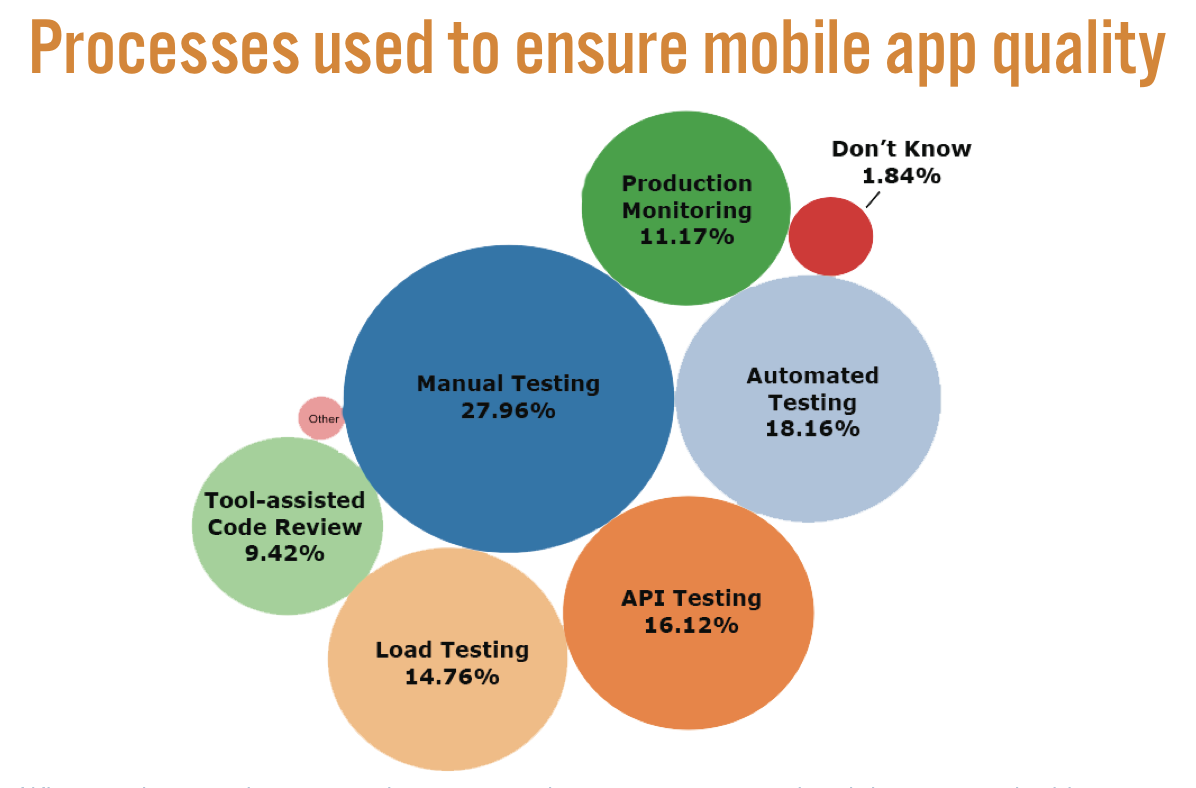
In our survey, as seen in the chart below, we found that about 28% of QA
professionals relied on manual testing as a component of their overall
quality strategy. Still, it can be impractical, to say the least, to
run manual tests after every code modification, especially in a mobile
DevTestOps environment committed to a rigorous continuous-deployment
schedule. That’s why the vast majority of testers (94%) are also using
at least two other traditional quality processes, such as
automated testing, API testing, and
load testing, in order to get the job done (and 33% use four to six processes).
 (A slide from SmartBear’s State of Mobile 2014 webinar and eBook, available here.)
Different apps may benefit from these approaches in different ways, such as employing load testing and
performance monitoring for likely resource hogs. But the use of automated
regression testing
is a pretty safe bet across the board, always ready to ensure that your
latest round of updates doesn’t break your app (often testing in
comprehensive ways that manual methods simply can’t). Tools like
SmartBear’s
TestComplete
deliver a powerful fusion of both robust regression scripts and
functional use tests, enabling a full range of automated mobile tests to
be easily written and deployed in batches on regularly programmed
schedules. As a crucial complement to hands-on mobile testing,
automated mobile testing can save time and money by significantly
expanding test coverage and catching more bugs—faster and more
thoroughly—than manual testing alone.
The Future of Mobile Testing
Given the complexities involved with the mobile market, it’s unlikely
that we’ll ever find a one-size-fits-all testing solution. There’s a
reason why one-third of testers use a combination of four to six
distinct methods. Every app is be different, with its own unique
purpose, context, and technical requirements. This means that certain
testing approaches will be more appropriate—and therefore far better
investments of time and money—for some dev projects over others. But
again, despite the complications, proper mobile testing should never be
simply bypassed or ignored. The mobile market is only on the move, and
the apps that stand out will be the ones to ensure that their creators
survive while their competitors fall by the wayside.
As uTest writes in their
eBook
on mobile testing, “Companies that recognize this trend for what it
is—a technological revolution—and take preemptive action to make the
quality, security and usability of their mobile applications top
priority, will find themselves with a tremendous advantage.”
This technological revolution is all the more apparent when we consider
that the term “mobile app,” as traditionally defined, is on the verge of
exploding in all directions over the coming months and years. The
sheer demand for apps is speeding up daily, and as applications are
becoming more powerful and more complex, the hardware they run on is
shrinking. Beyond the old smartphones, tablets, phablets, and iPod
Touches, an onslaught of wearables—smartwatches, fitness bands, and even
rings—are already
overtaking us. When you add to this picture Google Glass (and
forthcoming augmented-reality contact lenses), Oculus Rift, Google Cars,
Nest, and every other soon-to-be-omnipresent manifestation of
the Internet of Things
. . . well, let’s just say that the market for desktop and website
applications has met its match, at last. We are living in the age of
the mobile app, and it’s only just begun.
Further Resources
@Source: SmartBrain.com 