Sunday, April 30, 2017

AdventureWorks Demo Database Setup

If you are using SQL Server there are good chances that you are familiar with AdventureWorks. AdventureWorks is a Sample Database shipped with SQL Server and it can be downloaded from CodePlex site. AdventureWorks have replaced Northwind and Pubs from the sample database in SQL Server 2005. The Microsoft team keeps updating the sample database as they release new versions

Every new version of SQL Server should have its own Adventureworks database. The reason is that SQL Server comes up with new features with every version and most of the new features need a new dataset sample to demonstrate the capabilities of the features. This is the why every version of SQL Server has its own AdventureWorks database

Installing AdventureWorks Sample Databases from Microsoft

1. Type in the following URL into your browser's address bar

     http://msftdbprodsamples.codeplex.com/

2.  Click on the "Download" button on page
 

3.  Click on the recommended download link


Adventure Works 2014 Sample Databases
4.  Unizp the file you just downloaded
5.  Open the SQL Server Management Studio, then right click on "Databases" and then select "Restore Database"
SQL Server Manager Studio
6.  Select "Device" under "Source"
SQL Server Device
7.  Click on the "..." button, and the "Select" backup devices will appear, select "File" for
"Backup media type"
Select backup devices
8.  Click on the "Add" button, and select the "AdventureWorks2014.bak" file, then click "OK"
AdventureWorks2014.bak
8.  Click "OK" on the "Select backup devices" screen
Select backup devices
9.  Click "OK" on "Restore Database" window
Restore database
10.  A message will pop up that says you have successfully restored the AdventureWorks2014 database
Database 'AdventureWorks2014' restored successfully.
11.  The "AdventureWorks2014" database is now added to your SQL Server instance
AdventureWorks2014


12. Please Note Your Folder Where your Adventureworks Databse resides Should have "Read and Execute" Permissions
 Credits :Jason Huynh
 

Thursday, February 2, 2017

Software Professionals Guide for Fitness and Productivity


When people talk about the skyrocketing metabolism of Silicon Valley, it’s a metaphor for profits, innovation, a surge in products or services. But now it’s happening literally. There is a cultural shift afoot in the technology industry: fitness has gripped the so-called brogrammer. Software developers who see the world as a series of systems in need of optimization have turned that instinct inward. Call it the six abs of highly effective techies—HGH bodies for PHP minds

If you’re a software developer (or frankly, if you spend a large portion of your day sitting in a chair in front of a computer) you will be more productive if you find a way to incorporate a workout into your daily routine. I literally believe that if you’re working 8 hour days today, you will get more done working 7 hours and squeezing in a 30-40 minutes of physical exercise. I believe this because a couple months ago my family and I moved into the city a few blocks from where I work, and I traded long commutes sitting in traffic for some relaxing morning time with the family and a quick work out in the mornings at the fitness center down the hall. The value of living close to work and having a bit of relaxing time in the morning is probably fairly self explanatory, but for now I want to focus on why I’ve found exercising to be so valuable. I also want to call out a few things that I’ve learned in the process that I hope may make your life easier if you aren’t exercising regularly and decide at some point that you want to incorporate a work out into your day. I don’t claim to be a personal trainer or any kind of fitness expert (although I’ve consulted a few while putting together a program that’s effective and gets me in and out of the gym quickly). Don’t treat this post as a replacement for good advice from qualified health and fitness professionals; think of it as one computer geek sharing some practical tips with his fellow geeks about a particular way to get in shape and increase productivity.

Benefits of Exercise

From a pure productivity perspective, the biggest benefit to exercising for me is specific to working out in the morning. Rather than getting to the office feeling like I needed another two hours of sleep and only 4 cups coffee will get me through the day, I show up feeling awake and ready to start knocking off tasks in my queue. Because many of the folks on my teams tend to show up at 10 or 11 and work late my schedule is generally meeting free in the morning, which also makes it the most valuable time to be productive.
I don’t have evidence to support this, but anecdotally I have observed a link between fitness and career success. That’s not to say that you can’t have one without the other, but I believe that you have a better shot of being successful in your career if you work out on a regular basis. Working out makes you feel good, boosts your energy levels, helps strengthen your core muscles so that you’re comfortable sitting in a chair all day, gives you confidence, and perhaps most importantly gets you in a habit of setting goals and achieving them over long periods of time. When you’re jumping between jobs, there’s also evidence to suggest that interviewers make a hire/no hire decision that is extremely tough to overturn in the first 15 seconds of the interview process and whether you like it or not that first impression includes what you look like.

When to Exercise

Some people believe that working out in the morning boosts your metabolism throughout the rest of the day, but the limited research that I’ve seen seems to suggest that regardless of when you work out you get a short metabolism boost that goes away in a set amount of time. I’ve touched on why I find working out in the morning to be especially beneficial, but I would recommend working out at a time where you know you can be consistent; if you try to vary your workout daily according to your schedule you’re going to be way more likely to skip it. If the only way that you can be consistent is to take a quick jog on a treadmill in a 3 piece suit at lunch, do that… and do it consistently.

How to Excercise

Map out a routine that’s short and sweet, and ideally one that you enjoy. Get your heart rate up to your target zone and try to keep it up for 20-30 minutes. Pick a few exercises and do them in circuits with little or no rest between exercises (and a short rest between sets), at high intensity. Lean towards workouts that work large groups of muscles, for example doing push ups (or better yet, burpees) instead of bench press.
Personally I run between 1-2 miles and then pick 3 different exercises and do them in a circuit. I split the exercises into upper body, lower body, and core. I try to make sure that I hit each big muscle group at least once per week. It gets me in and out of the apartment gym in around a half hour, and I’ve found it to be effective. If you’re having trouble figuring out what exercises you should incorporate into your workout, chat with a trainer or check out one of the apps (there are several Crossfit WOD specific ones if you want to go that route) that are available on any phone.

How to Eat

One of the first things that I noticed when I started working out was that after my morning burst of energy I would start getting tired right before lunch. I figured out that eating protein in the morning helped, so I ordered a big tub of whey protein and started making a quick fruit/protein shake with some yogurt/milk every morning. Remember that your body needs protein to rebuild muscles after a workout, and if you’re like me you’re probably not in the habit of eating enough protein to start your day. Protein provides energy for a longer period of time than fat or carbs, so you’ll be getting fuel from your morning snack for longer.

In a Nutshell Whole Summary


Average 1-1.5 hours a day of endurance sports.  Get enough sleep.  Don't eat too much.
While 30 minutes a day of cardiovascular exercise is enough to reduce your actuarial risk of bad things like diabetes and heart disease, it takes about six hours a week to be in decent shape and ten for good shape.  Do cycling, cross-country skiing, rowing, running, snow shoeing, stand up paddle boarding, and/or swimming 5-6 days a week to get to that total.  The net impact on your schedule can be negligible - it'll give you mental white space so you don't wait as long for creative "aha!" moments, and make you sleep better so you need less.  Bicycle commuting can be especially time-efficient with time riding replacing time driving - in Silicon Valley you might swap 1:20  driving both ways during rush hour for 1:50  riding.  Ease into it, where adding 10% more time each week is a rule of thumb.  Have balance - even Olympic athletes spend 90% of their time at low intensity.  Have a lower volume/intensity week out of every 3-4.
Get enough sleep.  You need it for optimal mental and physical function.  A hard stop at night and same schedule on weekends makes this easier.  Go to bed early enough you wake up naturally when you want to with enough sleep instead of racking up sleep debt with an alarm clock.
Don't eat too much.  Don't eat entire servings because they're usually over-sized for one person.  Don't snack on free food when you're not hungry.  10 nuts totaling 100 Calories a day add up to 10 pounds a year.  Only eat enough to be sated 30 minutes after your last bite, not until you're full because your apetite lags behind.  Only eat when hungry.  Always eat when hungry so you don't get too ravenous to control yourself.

Mobile Application Testing- A new Boom in Testing Industry

Note: All the information are Collaborated from SmartBrain.com and various Other Sources.

The fact is, there is no major field of software engineering more rife with potential hazards than that of mobile development, and we’ve all experienced for ourselves the sudden surge of frustration that results in a deleted application.  In the rapidly growing mobile market—unlike the more familiar realm of desktop- and web-based software—your customer is often on the move, and the proverbial moment of truth is just a narrow slice of time, so you really don’t get a second chance to make a first impression.  An ugly GUI, a confusing UX, or a series of interminably slow API calls can lead to your app’s tragic demise before it ever has a chance to grow and thrive.

This is why mastering the art of mobile testing is increasingly important for any company that wants to remain competitive.  Far too many developers, it seems, are content to just throw their latest rushed apps at the App Store wall and see what sticks.  The approach is certainly understandable.  Software testing can be hard work.  To remain competitive in a fast-paced and crowded market, sometimes cutting corners makes sense.  But choosing speed and quantity over care and quality has never been a good long-term business strategy, and the app-store halls of Apple, Google, Amazon, Windows, BlackBerry, et al., are littered with thousands of one-star reviews that tell a tragic tale.

It doesn't have to be this way.  The vast majority of software firms already recognize the value of investing in the development of mobile apps, so it only makes sense to extend that investment into testing mobile apps as well, despite all of the added cost and complexity that programming and testing for a vast array of mobile platforms entails.  In the long run, the extra work involved in quality assurance usually pays off.  And in a world where Gartner estimates that $26 billion dollars in revenue was generated from 102 billion mobile app downloads in 2013, and we may be seeing over 268 billion downloads per year by 2017 (or around $68 billion dollars), that potential payoff for automating android testing may be worth taking seriously.

In this article, we’ll take a broad look at the state of mobile testing and development today, exploring its tremendous potential, its unique perils, and the exciting promise of what lies ahead in this continuously evolving field.

Rise of the Planet of the Apps

Ever since January 9, 2007, when Steve Jobs held aloft his magic iPhone and brought the world’s early adopters to their knees, we’ve been living in a different world.  It’s a world where, according to the International Telecommunication Union’s 2014 report, the total number of cellular subscriptions is fast approaching seven billion—one mobile phone for nearly every person on the planet—and 22% of those subscriptions are for smartphones.  Research by Business Insider indicates that prior to the iPhone, only 2% of the global population had smartphones—and the old BlackBerry and Treo, as far as app development went, weren’t particularly exciting.  But now, with one out of every five persons on the earth carrying an advanced computing platform in his or her pocket and more acquiring them every day, the creative potential and financial incentive for developers interested in mobile applications has never been greater.

In a “State of Mobile” study of 1,040 software developers, testers, and consumers conducted by SmartBear and published in early 2014, we discovered, among other things, that:
  • Nearly 30% of those building any kind of apps were building mobile apps
  • 54% of respondents who were building mobile apps had entered the space within the past two years.
  • 84% of those who were not currently building mobile apps planned to enter the space in the near future.
  • 30% of companies were planning to develop 5-20+ new apps in 2014.
  • 40% of consumers download 5-20+ apps in a single month.
Stats like these drive home the growing significance of the mobile market—especially the last two figures, which suggest that the monthly consumer demand is currently exceeding the entire annual supply of apps produced. You don’t need to be an economist to see the enormous market potential here.  And if you or your organization are among those arriving fashionably late to the mobile party, perhaps due to the common impression that most smartphone, tablet, or phablet apps are for social networking and gaming, be advised: a 55% majority of mobile app developers in our survey were working on applications for Business Productivity, Utility, and Finance. The rest of them were attending to the other usual suspect categories—Social Networking, Games, Lifestyle, Navigation & Travel, and Entertainment—and yet not one of these genres claimed, in itself, more than 6% of the developers polled. So it clearly isn’t all just fun and games, but no matter what your personal or corporate focus may be, there is probably sufficient demand out there to justify creating an app for that.
Still, with so much competition out there, which is only increasing with each passing day, what’s going to ensure that your app succeeds while others fail?  Once again, apart from originality there’s only one market factor in software development that you can reliably control, and that’s quality.  According to the consumer reports collected by our survey, nearly 50% of users will delete a mobile app if they encounter a single bug.  And as the following chart shows, they care about quality—particularly functionality and speed—more than developers and testers currently do:

(A slide from SmartBear’s State of Mobile 2014 webinar and eBook, available here.)
It’s therefore safe to say that when it comes to the success of mobile apps, nothing is more important to focus on than quality . . . or more challenging to attain.

Understanding the Challenge of Mobile Testing

Naturally, if quality assurance for mobile apps was easy, more people would be doing it (or at least doing it better).  But as anyone who’s ever taken a single step into the mobile minefield knows, things get rather tricky, fast.  Developers and testers are immediately confronted by multiple operating systems (and different versions of each OS, especially with Android), multiple devices (different makes and models of phones, tablets, phablets), multiple carriers (including international ones), multiple speeds of data transference (3G, LTE, Wi-Fi), multiple screen sizes (and resolutions and aspect ratios), multiple input controls (including BlackBerry’s eternal physical keypads), and multiple technologies—GPS, accelerometers—that web and desktop apps almost never use. There are countless testing tools to select from, and even then a home built piece of software may be an option.

Yet even before we take all of those shifting factors into account, we have to pin down what kind of app we want to develop or test in the first place.  There are native apps, web apps, and hybrid apps to choose between, and they’re each built differently.

Native apps, the most common form, are applications built to run on a specific mobile device’s hardware, sometimes with and sometimes without a data connection—like the Kindle app, for example, or Angry Birds. Web apps, however, almost always require a data connection, are usually designed to run across all platforms using the same basic code, and are really not “apps” in the app-store sense but are simply, as the name suggests, web-based applications.  The difference between an ordinary website and a web app in this context, though, is that these apps range from mobile-friendly versions of websites to websites that are custom-built (usually with HTML5, JS, CSS), from the ground up, specifically for display and use on mobile devices. Finally, with regard to hybrid apps, these are essentially web apps packaged in a native-app wrapper—available in app stores and designed for use only on mobile devices, but also relying heavily on communication with a website or web-hosted database, such as via APIs, in order to function at all.  (One common example is the Wikipedia app, which requires an active connection to Wikipedia.org’s online database to deliver its Apache Lucene search results.)

In other words, opening the Pandora’s Box of mobile testing and development is not for the faint of heart. But for those courageous souls who have dedicated their lives (or at least careers) to mastering the art and science of software quality assurance, let’s continue with a closer look at five of the biggest challenges facing QA testers of, say, native apps. (While we’re focusing on testers in this article, it’s good to bear in mind that the majority of developers, especially on agile production teams, also perform testing throughout the mobile-app production cycle—around 72% of them, according to our survey.)

(1) Device Fragmentation: These days, it isn’t simply a matter of testing an iOS app or an Android app; you have to test each app’s functionality and appearance across a huge variety of physical devices, which, as a result of possessing distinct hardware characteristics, utilize even the same versions of installed software differently.  If you’ve ever seen the selection in an AT&T store, browsed the collection at Verizon, or played with the phones in an O2 shop, you know that the actual variety of mobile devices on the market at any given time is itself enough to boggle the mortal mind.  You can, of course, choose to test your software on only the most popular models, but new devices are constantly being released, not making that task any easier.  Just think of the perennial Mac vs PC difficulties, especially before Macs adopted Intel chipsets. Then multiply that by Samsung, LG, HTC, Sony, Motorola, ZTE, TCL, Huawei, Nokia, Amazon, Apple, and others—plus all of the ROM, display, and OS variances within each of those manufacturers’ product lines.  Yikes.

(2) Data Consumption:  It’s no secret that mobile apps can wreak havoc on your phone bill.  For those not lucky enough to have unlimited data plans or a perpetual Wi-Fi connection, remaining mindful of one’s app usage is a very real concern. Google Maps, Waze, YouTube—all data-hungry applications can suck your allotted data-plan dry, and too many exorbitant payments to Verizon can make one rethink his or her smartphone habits.  The simplest solution is often to simply delete the most nonessential but data-hogging apps.  Don't let yours be one of them; test to see how much data your applications really use.  And while you’re at it, check for data-speed consistency too (i.e., does your app run as well on 3G or LTE as on Wi-Fi?).

(3) Processing Power and Battery Life:  Gamer, much?  Just like with laptop PCs, nothing taxes the processing power, memory, and battery life of a mobile device more reliably than video games.  Rendering high-res framerates smoothly always takes its toll, but games aren’t the only apps worth worrying about. Mobile web browsers excel at draining memory resources, and certain streaming-music apps don’t fare so great, either.  But these are just the obvious culprits.  Any kind of app could be a resource hog. If you don’t run performance tests to vet your application properly, you could be the next app creator responsible for draining an iPad battery before the morning subway commute is done.

(4) GPS, Biometric Scanners, Gyroscopes, Accelerometers:  Some of the things that most desktop and web application developers rarely, if ever, need to take into account are the very things that make mobile apps so incredibly useful.  But programming apps to use a phone’s GPS, gyroscope, fingerprint sensor, or accelerometer capabilities can be terribly problematic.  Does your geolocation-enabled dining app cease to function if it loses a GPS connection . . . completely?  Partially?  Can your e-reader app use the accelerometer to switch between horizontal and vertical screen orientations?  Can you program your Flappy Bird clone to use the iPhone’s gyroscope and make the game even harder?

(5) Touchscreen UX and GUI: The thing that changed everything, spawning the entire mobile-app world as we know it, was the original iPhone’s jaw-dropping touchscreen.  The fluidity of it, the natural, effortless user experience, simply dragging one’s finger across a rounded machine of smooth metal and glass resting gently in the palm of one’s hand—nothing like it had ever been seen before.  And nearly every smartphone and tablet computer today is modeled after its design. But it wasn’t the hardware alone that made it work; it was the seamlessly integrated GUI in the form of iOS and its touch-sensitive apps. The bar was set high from the start, and any app developers today have to clear it. So when testing your app, ask yourself: Is this app intuitive?  Is it easy to figure out and use?  Does it respond to my every gesture and whim as it should? Most of all, is it pretty?

So, as you can see, although there are clearly some big challenges facing testers of mobile apps, fortunately the same familiar tools and techniques that are used for desktop and web applications can also be used to test mobile ones—along with a few additional tools, like emulators, to make testing a vast array of devices just a little bit easier.

Choosing a Mix of Mobile Testing Solutions

Because 50% of mobile users will delete an app if they find just one bug, putting in the time and effort to make sure that your applications are error-free is critical.  But eradicating programming glitches is only part of the story.  An equally important task for testers is to help ensure the overall quality and value of the product itself, striving to look at an app more objectively than its developers typically can.  Does it perform as expected? Is it intuitive? Is it well-designed and easy to use?  And most importantly: Will your end-users love it and want to share it with their colleagues and friends?

Those kinds of questions can usually be answered by the most common quality-assurance practice for mobile apps: manual testing. Using the actual smartphones or mobile-OS tablets at their disposal, testers can perform a variety of usability and functional tests on apps under development, checking features such as sign-up and login fields, menus and navigation, touch gestures and scrolling, input key functionality, screen size and GUI appearance, connection speed and data handling, interruptions (such as how your app responds to an incoming phone call or text), operating system versions, crashes and error messages (does your app display an actionable message or simply stop working?), accelerometer response, etc. Seeing how an app functions in real time on a real device is, of course, an irreplaceable testing method, and testers should try this on as many of the most popular devices that they can get their hands on (or enlist beta testers to help).

But with so much device variance in the marketplace, it’s impossible to physically test them all—and yet it’s getting close to being possible, virtually.  To take manual testing all the way, emulators and simulators are an app tester’s best friend, and software tools like Genymotion—along with common SDKs (software development kits) for Android and iOS, including the iOS Simulator—allow testers to check their apps’ functionality and behavior across a wide variety of virtual devices. These digital versions of smartphones and tablets replicate not only different OS versions, but also much of the hardware performance of the most popular mobile devices on the market today. Granted, emulators won’t necessarily reveal things like apps’ excessive battery use, struggles with bad Wi-Fi connections, or the consequences of a suddenly lost GPS signal, but they do allow a much greater number of devices to be tested, at least generally, than could ever be achieved in a reasonable timeframe through physical testing alone.

In our survey, as seen in the chart below, we found that about 28% of QA professionals relied on manual testing as a component of their overall quality strategy.  Still, it can be impractical, to say the least, to run manual tests after every code modification, especially in a mobile DevTestOps environment committed to a rigorous continuous-deployment schedule.  That’s why the vast majority of testers (94%) are also using at least two other traditional quality processes, such as automated testing, API testing, and load testing, in order to get the job done (and 33% use four to six processes).
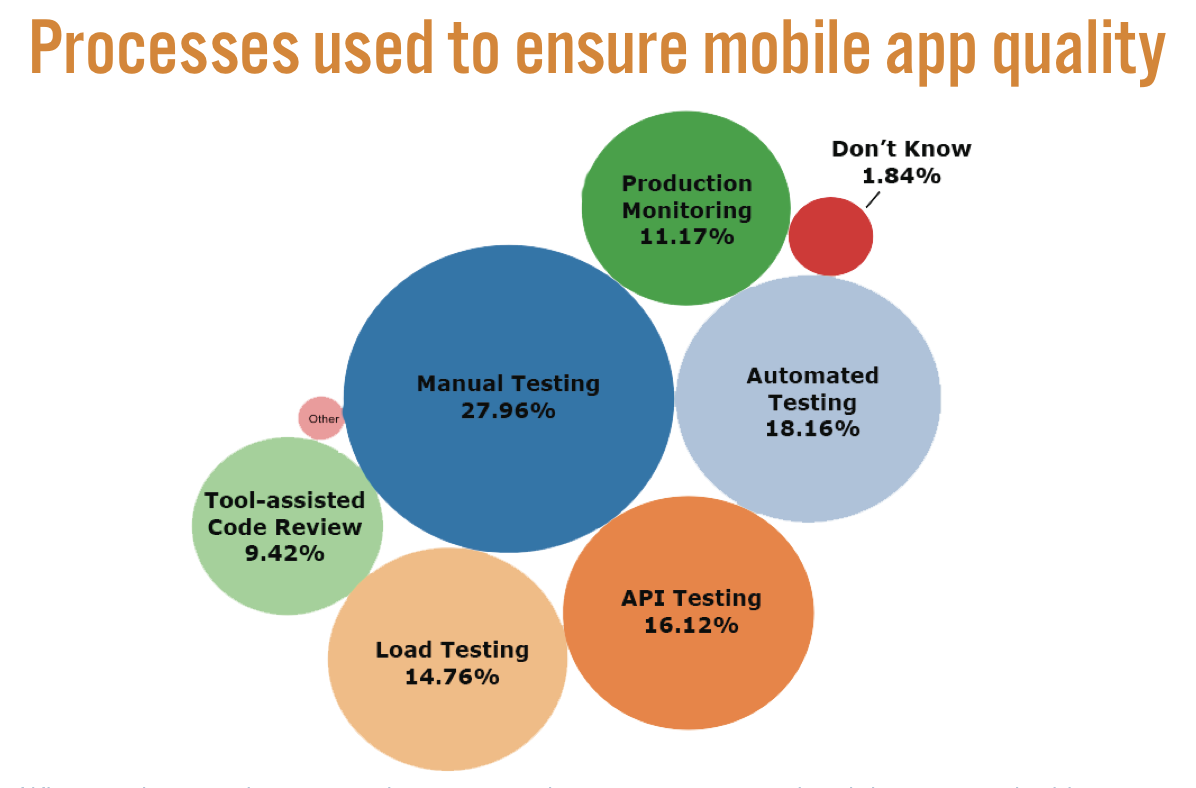
(A slide from SmartBear’s State of Mobile 2014 webinar and eBook, available here.)
Different apps may benefit from these approaches in different ways, such as employing load testing and performance monitoring for likely resource hogs. But the use of automated regression testing is a pretty safe bet across the board, always ready to ensure that your latest round of updates doesn’t break your app (often testing in comprehensive ways that manual methods simply can’t).  Tools like SmartBear’s TestComplete deliver a powerful fusion of both robust regression scripts and functional use tests, enabling a full range of automated mobile tests to be easily written and deployed in batches on regularly programmed schedules.  As a crucial complement to hands-on mobile testing, automated mobile testing can save time and money by significantly expanding test coverage and catching more bugs—faster and more thoroughly—than manual testing alone.

The Future of Mobile Testing

Given the complexities involved with the mobile market, it’s unlikely that we’ll ever find a one-size-fits-all testing solution.  There’s a reason why one-third of testers use a combination of four to six distinct methods.  Every app is be different, with its own unique purpose, context, and technical requirements.  This means that certain testing approaches will be more appropriate—and therefore far better investments of time and money—for some dev projects over others.  But again, despite the complications, proper mobile testing should never be simply bypassed or ignored.  The mobile market is only on the move, and the apps that stand out will be the ones to ensure that their creators survive while their competitors fall by the wayside.

As uTest writes in their eBook on mobile testing, “Companies that recognize this trend for what it is—a technological revolution—and take preemptive action to make the quality, security and usability of their mobile applications top priority, will find themselves with a tremendous advantage.”

This technological revolution is all the more apparent when we consider that the term “mobile app,” as traditionally defined, is on the verge of exploding in all directions over the coming months and years.  The sheer demand for apps is speeding up daily, and as applications are becoming more powerful and more complex, the hardware they run on is shrinking.  Beyond the old smartphones, tablets, phablets, and iPod Touches, an onslaught of wearables—smartwatches, fitness bands, and even rings—are already overtaking us.  When you add to this picture Google Glass (and forthcoming augmented-reality contact lenses), Oculus Rift, Google Cars, Nest, and every other soon-to-be-omnipresent manifestation of the Internet of Things . . . well, let’s just say that the market for desktop and website applications has met its match, at last.  We are living in the age of the mobile app, and it’s only just begun.
Further Resources
@Source: SmartBrain.com

Wednesday, April 22, 2015

Dealing with programmers or Developers

When I started my career as a software tester, I was made aware of an ongoing antagonism between developers and testers. And it took me no time or effort to be convinced that this is all too common. I received the kind of unwelcome response from developers that I think all testers experience at some point during their careers.
From indifferent shrugs to downright hostility (sometimes cloaked as sympathetic smiles), a tester has to endure a lot from developers. It can be hard to keep a positive attitude. But it’s up to us to keep our priorities straight, and push toward a quality project.
I picked up a beautiful line from Cem Kaner’s Testing Computer Software: “The best tester is not the one who finds the most bugs or who embarrasses the most developers. The best tester is the one who gets the most bugs fixed.”
So how can we do that?
Be Cordial and Patient As a tester you may find it more difficult to convince a developer about a defect you’ve found. Often, if a tester exposes one bug, the programmer will be ready with ten justifications. It’s sometimes difficult for developers to accept the fact that their code is defective—and someone else has detected it.
Developers need support from the testing team, who can assure them that finding new bugs is desirable, healthy, and important in making the product the best it can be. A humanistic approach will always help the tester know the programmer better. Believe me, in no time the same person could be sitting with you and laughing at mistakes that introduced bugs. Cordiality typically helps in getting the developer to say “yes” to your bug report. An important first step!
Be Diplomatic Try presenting your findings tactfully, and explaining the bug without blame. “I am sure this is a minor bug that you could handle in no time. This is an excellent program so far.” Developers will jump and welcome it.
Take a psychological approach. Praise the developer’s job from time to time. The reason why most developers dislike our bug reports is very simple: They see us as tearing down their hard work. Some testers communicate with developers only when there is a problem. For most developers, the software is their own baby, and you are just an interfering outsider. I tell my developers that because of them I exist in the company and because of me their jobs are saved. It’s a symbiotic and profitable relationship between a tester and a developer.
Don’t Embarrass Nobody likes mistakes to be pointed out. That’s human nature. Try explaining the big-picture need for fixing that particular bug rather than just firing bulky bug reports at developers. A deluge of defects not only irritates the developer, it makes your hard work useless for them.
Just as one can’t test a program completely, developers can’t design programs without mistakes, and they need to understand this before anything else. Errors are expected; they’re a natural part of the process.
You Win Some, You Lose Some I know of testers who make their bug reports as rigid as possible. They won’t even listen to the developer’s explanations for not being able to fix a bug or implement a feature. Try making relaxed rules for yourself. Sit with the developer and analyze the priority and severity of a bug together. If the developer has a valid and sensible explanation behind her reluctance to change something, try to understand her. Just be sure to know where to draw the line in protecting the ultimate quality of your product.
Be Cautious Diplomacy and flexibility do not replace the need to be cautious. Developers often find an excuse to say that they refused to fix a bug because they did not realize (or you did not tell them) how serious the problem was. Design your bug reports and test documents in a way that clearly lays out the risks and seriousness of issues. What’s even better is to conduct a meeting and explain the issues to them.
A smart tester is one who keeps a balance between listening and implementing. If a developer can’t convince you a bug shouldn’t be fixed, it’s your duty to convince him to fix it.

Tuesday, April 21, 2015

Introduction to Internet Information Services (IIS)

Introduction to Internet Information Services 7.0

The basics of Internet Information Services 7.0 also known as IIS 7.0. IIS 7.0 is the web server role in Windows Vista and Windows Server 2008.

Introduction

Internet Information Services 7.0 (IIS 7.0) is Microsoft’s latest version of their web server. IIS has been included with Windows Server since Windows 2000 Server as a Windows Component and since Windows NT as an option. IIS 7.0 is available with Windows Vista and Windows Server 2008, which is scheduled for release in Q1 2008. IIS 7.0 has gone through a major overhaul and has been completely redesigned from scratch. This has been done to make the most flexible and secure platform for web and application hosting.
IIS 7.0 has been designed to be the most secure and flexible web and application platform from Microsoft. Microsoft has redesigned IIS from the ground and during this process the IIS team has focused on 5 major areas:
  • Security
  • Extensibility
  • Configuration and Deployment
  • Administration and Diagnostics
  • Performance

What’s New

Almost everything is new in IIS 7.0. Microsoft has focused on modularity when building IIS 7.0, which means that only the binaries needed is installed, this minimizes the attack surface of the web server.
An example to this: If you need the FTP Server or the Caching feature in IIS, you install the FTP Server or Cache modules to manage and enable either the caching activity or the FTP Server.
Windows Server 2008 will include all the IIS features needed to support hosting of web content in production environments. Windows Vista only has some IIS features and the features depend on your Vista version. IIS 7.0 in Windows Vista is ideal for building and testing web applications. Additional modules and features will be available from Microsoft or you can code your own, maybe even buy some from 3rd party vendors.

Architecture

Besides the changes to the core components of IIS 7.0, the focus has been with modular design in mind. The modular design gives more flexibility and security to IIS 7.0, compared to previous versions of IIS.

Figure A: Overview of the main modules and components of IIS 7.0
The main advantage of the new modular design is that it helps to reduce the footprint, which results in a more secure web server platform, since the attack surface has been minimized.
IIS 7.0 provides a new native core API, which replaces the ISAPI filter from previous versions of IIS. With the new API it’s now possible to extend IIS with extra modules or even replace any of the built-in modules with custom written modules.
New modules can be downloaded from Microsoft’s IIS.net website, where Microsoft maintains a download repository for IIS: http://www.iis.net/downloads

Administration

There are several ways of administrating IIS 7.0.
  • The GUI way using IIS Manager
  • APPCMD command tool
  • Remote administration using IIS Manager
  • Scripting using Windows PowerShell
  • Microsoft.Web.Administration API interface
The GUI Management interface has also been redesigned, the new IIS Manager is now more task-oriented and action based, as we know from ISA Server and the new Exchange Server 2007.

Figure B: Screenshot of the IIS Manager
IIS Manager can be used to configure IIS and ASP.NET settings, the configuration settings will be written to the xml configuration files. As something new, Health and diagnostics information can now be seen and run as integrated tools directly from within IIS Manager and is already a part of IIS 7.0.
APPCMD is the new main general purpose command prompt tool for IIS 7.0, which can be used for administration and configuration of IIS. APPCMD is the new enhanced version of the old adsutil.vbs, for those of you who are familiar with that tool from IIS 6.0.
Remote Administration has been enhanced and is now possible using the IIS Manager, communicating securely over https to the web server.
There’s also the option of scripting all IIS management. This is now done using Windows PowerShell, which is Microsoft’s new scripting language. It’s an easy and effective way of handling administration of IIS on your web server and this is especially useful if you manage several web servers or large web farms. Windows PowerShell can be used directly against the WMI interface of IIS or used to read and write in the IIS 7.0 XML configuration files.
IIS 7.0 has backward compatibility with the IIS 6.0 metabase and the ADSI and WMI scripting interface known from IIS 6.0, which means that all your old scripts for IIS 6.0 will still work on IIS 7.0.
Microsoft.Web.Administration API is the interface targeted to developers, who want to code their own programs or scripts to manage IIS 7.0.
In IIS 7.0 it’s now possible to delegate the management of IIS and the web sites. You can now delegate full administrative access to the site owners of a website. The site owners can then control and manage all the website settings using IIS Manager, without compromising server security. All the settings the site owners manage, are written to the web.config xml file of their own website.

Configuration

The configuration has been made simple and is based on distributed XML files that hold the configuration settings for the entire IIS and ASP.NET.
Configuration settings can be done globally for the entire web server or for specific websites using either the XML files or through the GUI Management interface. The GUI just writes the configuration settings to the same XML files. The main xml configuration files in IIS 7.0 are:
  • Applicationhost.config
  • Global web.config
  • Machine.config
  • Site web.config
  • App web.config
By using xml based configuration files, deployment and scale-out in large web hosting environments has been optimized. It’s fairly easy to copy the IIS configuration to a new server and be up and running relatively quickly.
Handling replication of web server configuration is also relatively easy with IIS 7.0 compared to IIS 6.0, because of the xml based configuration files. This makes it very easy to replicate and deploy configurations in larger web farm environments. With IIS 6.0 this was best handled by using Microsoft Application Center 2000 or other 3rd party products.
Shared Configuration is a new feature of IIS 7.0, which is designed for web farm scenarios. With Shared Configuration it’s now possible for multiple web servers to share a single configuration file (applicationhost.config). A master of the applicationhost.config file will be placed on a common UNC path. The Shared Configuration feature is a great alternative to the perspective of replicating IIS settings.
The Applicationhost.config xml file is the main configuration file of IIS 7.0, this configuration file contains all the information about sites, virtual directories, applications, application pools and global settings for the web server.
Content replication can relatively easy been managed by simple x-copy or robocopy commands, as well as specific website configurations, which are saved in web.config xml files within each website.

Conclusion

With the redesign of IIS, Microsoft has really focused on making the IIS 7.0 a better web server for everyone, from IT Professionals, Developers to Web Hosters. To sum up I’ll try to highlight some of the main reasons why I believe IIS 7.0 is a strong product:
  • The product is more secure – only the binaries needed are installed
  • It’s extendable in a flexible way, because of the new modular architecture
  • It’s easier to scale-out – because of the simplicity in configuration, based on xml files
  • Better performance – due to the improvements to the core of IIS (http.sys)
There are plenty of opportunities for trying out IIS 7.0 yourself and getting familiar with it before the official release.
IIS 7.0 is available for public download together with the latest version of Windows Server 2008, currently in Beta 3. You can download the Windows Server 2008 beta from: http://www.microsoft.com/windowsserver2008/default.mspx.
Microsoft has created a special Go Live license, which is available for free and permits customers to deploy beta releases of IIS 7.0 in live production environments, before the official release of Windows Server 2008, which is scheduled for release in Q1 2008.

Tuesday, August 12, 2014

Open Source Tools- A Future of Software Testing


Growth of open source
The recent recession has tightened the budgets of organizations
the world over and most software and services companies have
really felt the pinch In the
midst of the recession, an Economist article caught the zeitgeist
with the headline “
Open-source software firms are flourishing
”.
In general there’s been a real increase in open-source success
stories in the media, while industry analysts like IDC and Gartner
have been investigating open-source adoption and publishing results that show strong growth in the sector.
As long ago as 2008, Gartner
surveyed 274 enterprise companies
globally
and found that 85% had already adopted open source,
with most of the remaining expecting to do so within the following year. That prediction came to fruition. Forrester’s 2009
report “
Open-Source Software Goes Mainstream
” questioned
2000 software decision makers and concluded that open source
had risen to the top of the executive agenda, with the author no
-
ting that “the mandate’s coming from higher up” and that many
bosses are now demanding “faster, cheaper, better”. This was a
major step- change for open source, which had historically ente
-
red organizations under the executive radar from the bottom-up,
installed by IT and programming teams and gradually gaining
traction through the organization. That situation has now turned
on it’s head with the demand coming from the top. In a
May 2009
report by Wall Street & Technology
, Accenture echoed this, saying
that „financial services firms are taking a different look at open-
source technology now that they are financially constrained”. This
article cited major investment banks not just using but actually
contributing to open-source projects, recognizing a further step-
change and a maturity to open-source adoption that goes beyond
simplistic cost savings.